Numlock is something that should be always on. I don’t understand why it is often off at start up. If that is the case for your system, this page will help you to turn on the Numlock as system start up in Linux.
BIOS
There is an option in BIOS that lets you set the status of Numlock at start up. You will have to search around for this one – it is located in different places in different BIOS versions. Make sure that it is on.
KDE
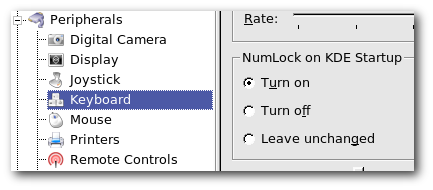
If the BIOS trick did not solve the issue, KDE has a configuration option where this can be set. That’s why I love KDE – whatever you want, there is an option for that…
Control Panel -> Peripherals -> Keyboards
numlockx
It you still have the problem, install the program called ‘numlockx‘. This will turn on the Numlock at start up.
you shud really consider renaming ur site to “kde-desk” rather than lindesk.atleast focus equally on Gnome,gtk+2 and Xfce like Desktop env and libs.they are rocking for many and fyi Gnome users are very much happy unlike what kde fanatics are spreading.Gnome stands for simplicity and the pioneer project of FSF.
Sorry about that – I will try to write more articles for Gnome in the future. But I use KDE – most of my tips will be KDE specific. I will try to yet some of my ‘Gnome’ friends to contribute some articles.
Ahh.. Thank You.
This is something that I’ve been desperately looking for. Num Lock switched off was very annoying to me.
Thanks for writing this up!
Congrats on your new blog. Looking forward to read more 😀 great stuff.
How can I switch on NumLock in Gnome?
I don’t want to go to BIOS.
I am interessted in command or something else to do.
@yura
You could use the numlockx program to do it.
it probably has to do with the fact that a lot of laptops use some keys as a numpad when numlock is on. I can imagine it would get annoying for laptop users to have to turn it off every time they wanted to type.
There’s obviously a reason you’ve chosen KDE.
Here’s one reason why you’d want it off: some keyboards have the number pad as an overlay on the regular keyboard, rather than along side of it. In this case, you’d prefer that it was off. Your post helped me figure out how to do the this too, so thank you.
Numlock sucks. I hated it was on by default in windows when I used it. I turned it off EVERY time I turned on my computer.
BinnyVA, thanks for help. works fine:)
So, there is no way to have numlock on by default at the start of Gnome?
plogan,
# BinnyVA Says:
March 20th, 2008 at 8:50 pm
@yura
You could use the numlockx program to do it.
at what point during the boot process will numlockx turn the numlock on?
I was looking for the numlock to be on when i login.
The kde option turns it on after loging-in when kde starts.
It there’s a BIOS setting, Linux should, like a certain DOS-based OS, check that and comply. Or better yet let the hardware check it and leave things alone. Or however it works.
Point is, that way users can have it the way they need it the the simplest setting made at the most basic level.
A separate program will still be needed, though, to address cases where the BIOS has no setting.
@askrabal – you are right. By the time you’re able to log in, NUMLOCK should already be in the state you want it.