
Audacious is not among the ‘star media players’ in Linux – so many people never try it out. But those who have tried it out like it. For the sake of this article, I installed it – and I liked it. I even considered switching from amaroK to Audacious.
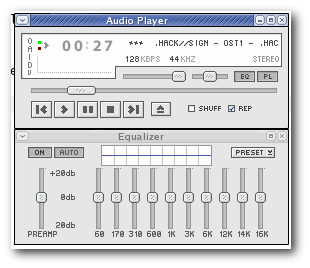
Most of the features I wanted in an MP3 player is present in Audacious. They where not turned on by default – but it was easy enough to enable the plugin.
Advantages
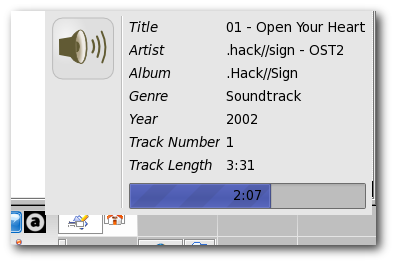
- System Tray
- Just enable the plugin called Status Icon. And the system tray hover information is one of the best I have seen yet…
- Global Hotkeys
- This feature is available using a plugin called Global Hotkeys(for version 1.4+). I have not managed to install this plugin yet – so I cannot comment on it.
- OSD
- There is a OSD plugin that shows the name of the song on song change.
Disadvantages
However, there are some problems as well…
- No Media Library
- I don’t expect Audacious to get one without sacrificing the ‘simple/easy to use’ advantage.
- Playlist Scrolling is Slow
- I noticed that the the playlist does not scroll smoothly if you have a lot of songs. This may be problem in just my system – could anyone confirm this?
Conclusion
I am forced to conclude that Audacious is better than XMMS for those who are searching for a simple MP3 software. But for those searching for more advanced features, amaroK might be a better choice – and for that reason I as sticking with Amarok.
There are so many choices for music player with Linux. I have always felt overwhelmed by the massive features in Amarok and Rhythmbox. This is exactly what I need to listen to my music…thanks for the pointer…
i completely agree. i always thought XMMS was the best, but i’ve switched.
the lack of a media library is its only downside, but i’m thinking someone will make a plugin for it soon.
The main reason I use audacious is because it has a built-in equalizer. Many of the other alternative media players for Linux don’t seem to have equalizers and also don’t seem to want to support this feature.
The major drawback of audacious is being stuck without a media library. Adding a large folder containing audio files seem to bring audacious to a freeze. Very frustrating — something I’m sure a media library would fix!
Audacious, is actually a really good player and the in built equalizer is quite a nifty feature.
Speaking of media players, you may enjoy this article.
The Best Media Player
Is realyy a great player, an the PLAYLIST SCROLL IS AS SLOW AS YOU CONFIGURE IT. Go to preferences, mouse, then in the second parameter adjust the wheel to change as many lines as you wish.
Hope this will help to enjoy more your Audacious.
I searched for very long time for a media player that answers to my very reasonable exigence: be as simple to use as my beloved foobar2000, which is not supported on linux.
And audacious did very well. It has the features I want to (scrobbler essentially, but the built in equalizer is a big plus too.
I have no problems loading big folders (I often add the folder “/home/*********/Music” which is more than 50 GB huge and despite it takes a little more time than foobar did, it works almost perfectly.
Another drawback would be the lack of podcasting function. But hey, isn’t Rythmbox made for that 😉 ?
i’ve installed cmus, ncursesw, and libmad, but somehow my cmus still cannot play mp3 files…
any idea?
Absolutely perfect! 😉
I wasn’t satisfied with Amarok as standard player in OpenSUSE, because it’s too complicated. Audacious is nice and easy to play.
that’s a nice skin, where can i find that one ?
I really became hooked on Audacious – but, the version distributing w/ Kubuntu v12.04.2 (for the new 3.x kernel) is defective. The “scale” feature seems to be entirely gone. I have a high-res display (1400×900), and every part of the player is tiny, tiny, tiny on the screen! #%@^&!!! Unusably tiny. Uselessly tiny. Defectively tiny. Miniscule. Can’t read anything at all on the display tiny. Did I mention it’s too small?
This article is now very old and outdated. Audacious player has changed significantly since this article was written. Regardless of all the players I have used extensively throughout the years, Audacious is still my go-to player. Although on the surface, it looks plain and featureless, once you dig into its settings, you’ll find more than enough tools and features to keep you entertained and informed.
One of the best things about Audacious is its easy-of-use. I also use it to play music as a DJ at a nursing home (nope, I’m not only playing music from the 40’s… there are unfortunately 30 year old people who have to live there). I’m able to display the album cover on their 70″ flat-screen TV and show the song title once the tune starts to play. I also use the visualization feature to keep the screen looking lively.
I also bring different gear to the nursing home so I use the saved equalization presets for the various speakers and amps I bring along.
To me, this player is the best of the bunch although it’s not full of eye-candy and won’t bowl you over with its plain looks., But it really does get the job done.